
Ik vond dit na veel zoeken en heb hier veel tijd aan besteed in VS 2014
- Maak
Database ProjectGenaamd "CLR_Test" - Maak
LibraryVoor WCF-client "CLR_Service_Client" -
Serivce Refrencetoevoegen van wcf-service naar "CLR_Test" en voeg vervolgens de referentie "CLR_Service_Client" toe aan "CLR_Test"
4. U moet de DB-optie wijzigen om onveilige assembly's uit te voeren met de onderstaande codeALTER DATABASE SaleAutomation SET TRUSTWORTHY ON RECONFIGURE -
In de "CLR_Test"
Project Propertiesin deSQLCLRtabsetPermission levelnaarUnsafe(een andere manier is dat je na het publiceren van het project het niveau van sql-serverbeheer wijzigt en een andere manier is om het machtigingsniveau toe te voegen aan het publicatiescript, je kunt ze allemaal gebruiken,
maar je moet opmerken dat als je vanproject propertiesalleen "CLR_Test"-project maakt automatischUnsafeen u moet andere manieren gebruiken om "CLR_Service_Client"Unsafein te stellen )
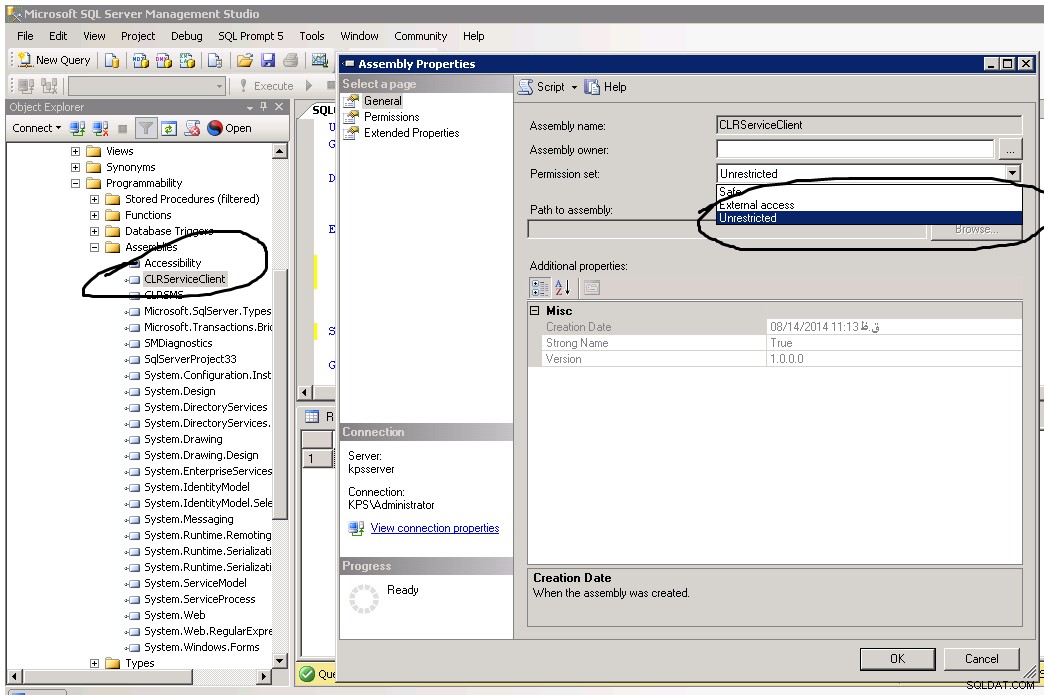
6.Voer deze scripts uit om Sqlserver toe te voegen om de wcf-service te kunnen uitvoeren
CREATE ASSEMBLY
SMDiagnostics from
'C:\Windows\Microsoft.NET\Framework\v3.0\Windows Communication Foundation\SMDiagnostics.dll'
with permission_set = UNSAFE
GO

CREATE ASSEMBLY
[System.Web] from
'C:\Windows\Microsoft.NET\Framework64\v2.0.50727\System.Web.dll'
with permission_set = UNSAFE
GO

CREATE ASSEMBLY
[System.Messaging] from
'C:\Windows\Microsoft.NET\Framework\v2.0.50727\System.Messaging.dll'
with permission_set = UNSAFE
 GO

CREATE ASSEMBLY
[System.IdentityModel] from
'C:\Program Files (x86)\Reference Assemblies\Microsoft\Framework\v3.0\System.IdentityModel.dll'
with permission_set = UNSAFE
GO

CREATE ASSEMBLY
[System.IdentityModel.Selectors] from
'C:\Program Files (x86)\Reference Assemblies\Microsoft\Framework\v3.0\System.IdentityModel.Selectors.dll'
with permission_set = UNSAFE
GO

CREATE ASSEMBLY -- this will add service modal
[Microsoft.Transactions.Bridge] from
'C:\Windows\Microsoft.NET\Framework\v3.0\Windows Communication Foundation\Microsoft.Transactions.Bridge.dll'
with permission_set = UNSAFE
GO

CREATE ASSEMBLY -- this will add service modal
[System.Runtime.Serialization] from
'C:\Windows\Microsoft.NET\Framework\v3.0\Windows Communication Foundation\System.Runtime.Serialization.dll'
with permission_set = UNSAFE
GO
CREATE ASSEMBLY -- this will add service modal
[System.ServiceModel] from
'C:\Windows\Microsoft.NET\Framework\v3.0\Windows Communication Foundation\System.ServiceModel.dll'
with permission_set = UNSAFE
GO
- nu publiceer je je project en voer je de opgeslagen procedure uit en geniet ervan.